Your Home Responds Before You Wake Up

WispyAlert detects approaching visitors and triggers your smart home automatically — lights turn on, cameras start recording, intruders leave. No phone-checking required.

The Problem with Alert-Based Security

"I turn my phone off at night." Sound familiar? Traditional security only works if you're awake and watching.

Requires Your Attention

Most security systems send you an alert and wait for YOU to do something. At 3 AM, that notification sits unread while you sleep.

Too Late to React

By the time your camera alerts you, someone is already at your door. Even if you're awake, what can you realistically do in 5 seconds?

Alert Fatigue

After the 50th notification about a car driving by, you start ignoring them. The one that matters gets lost in the noise.

Detection That Triggers Action

WispyAlert doesn't just notify you — it tells your smart home to respond. Automatically.

Early Detection

Detects the phone in someone's pocket while they're still 50+ feet away — before they reach your camera's view or trigger your motion sensor.

Instant Trigger

The moment an unknown device approaches, WispyAlert fires a webhook to your smart home. No human decision needed. No delay.

Your Home Responds

Porch lights flood on. Cameras start recording. Dog barking sounds play. The intruder sees an "awake" house and moves on — while you sleep.

What Happens at 3 AM
Someone
approaches
WispyAlert
detects signal
Webhook
fires
Lights
turn on
Intruder
leaves

You wake up in the morning. Check your camera. See someone walked up, lights came on, they left. You slept through it.

Smart Learning, Zero Configuration

WispyAlert learns your home's "normal" automatically during the first 24 hours.

Hour 0
Plug In & Connect

Simple setup wizard connects WispyAlert to your WiFi. Learning mode begins automatically.

Hours 1-12
Daytime Patterns

WispyAlert observes your household's devices, learns your neighbors' patterns, and notes regular delivery traffic.

Hours 12-24
Nighttime Baseline

Quieter hours help establish what "normal" looks like at night — crucial for setting sensitive overnight thresholds.

Hour 24+
Protection Active

WispyAlert switches to operational mode. Known devices are ignored. Only new, approaching devices trigger alerts.

Intelligent Filtering

Not every signal is a threat. WispyAlert knows the difference.

Day/Night Sensitivity

More sensitive thresholds after dark, when unexpected visitors are more concerning.

Noise Filtering

Single blips and static signals are filtered out. Only sustained, approaching patterns matter.

Known Device Ignore

Your family's phones, your neighbor's car — learned during setup and ignored forever.

One-Click Ignore

Regular mail carrier triggering alerts? One click adds them to your ignore list.
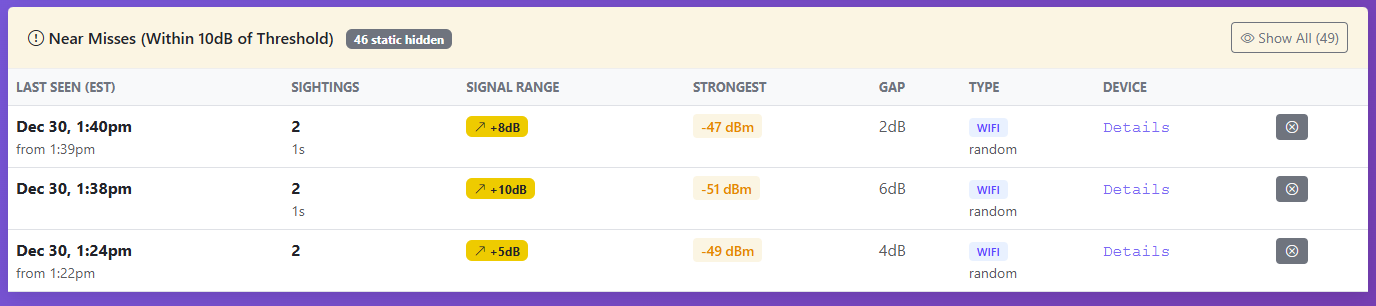
WispyAlert Dashboard showing alerts, near misses, and Quick Ignore button

Neighborhood Awareness

See the bigger picture with community-powered insights.

When you opt in to neighborhood sharing, you can see anonymized alerts from nearby WispyAlert users on a map. This helps you:

  • Spot patterns — Is someone going door-to-door in your area?
  • Stay informed — Know if there's unusual activity on your block
  • Community safety — Your alerts help your neighbors too

Privacy first: No personal data is shared. Just anonymized alert locations and times.

Neighborhood Alert Map

See anonymized alerts from nearby WispyAlert devices

Screenshot: Map View

Works With Your Smart Home

Already have smart lights or Home Assistant? You're ready. Don't have anything yet? A $15 smart bulb gets you started.

Home Assistant

Full local control. Advanced automations. The choice for serious DIY smart home users.

IFTTT

Simple setup. "If WispyAlert detects approach, then turn on porch light." Done in 2 minutes.

Zapier

Multi-step workflows. Log to spreadsheet AND send text AND trigger camera. Power user territory.

Don't Have a Smart Home Yet?

You don't need a complicated setup. Here's the simplest path:

1
Buy a WiFi smart bulb
for your porch (~$15)
2
Create a free
IFTTT account
3
Connect WispyAlert
→ bulb turns on

Total cost: WispyAlert + one smart bulb. Total setup time: 15 minutes.

What Can You Automate?

Turn On Porch Lights

The #1 deterrent. A dark house looks empty. Lights suddenly coming on says "someone's home and they saw you."

Start Camera Recording

Most cameras start recording on motion. WispyAlert starts them earlier — capture the full approach, not just the arrival.

Play Dog Barking

No dog? No problem. A speaker near the door playing barking sounds is surprisingly effective.

Flash Interior Lights

Silent alert for inside the house. Bedroom light blinks twice — you know someone's outside without any noise.

Turn On TV/Radio

Voices and light from inside the house signal occupancy. An intruder hears a TV and keeps walking.

Log Everything

Keep a timestamped record of every approach. Useful for patterns — or for police reports if needed.

Your Security Dashboard

Everything you need to see at a glance, with deep details when you want them.

Screenshot: Main Dashboard

Show alerts, near misses, device status, thresholds

Screenshot: Device Detail View

Show MAC detail page with full history, signal range, add to ignore

Dashboard Features

Real-time alerts and near misses
Signal strength visualization
One-click ignore for regulars
Day/Night threshold display
Device history and patterns
Timezone support

Honest Expectations

WispyAlert is powerful, but let's be real about what it can and can't do.

You Need a Smart Device to Trigger

WispyAlert is the sensor — it needs something to control. A $15 smart bulb is enough to start. More devices = more options.

It's a Layer, Not a Replacement

Keep your cameras and alarms. WispyAlert makes them better by triggering them earlier. Think of it as the first domino that starts the chain.

Some People Don't Carry Phones

Rare, but possible. If someone leaves their phone behind, WispyAlert won't detect them. Your camera and motion sensors are still there as backup.

Not 100% — Nothing Is

Signal strength varies. Weather, walls, and device differences all play a role. The 24-hour learning period calibrates for your environment, but occasional quirks happen.

Security That Works While You Sleep

WispyAlert + a smart light = automatic protection. No phone-checking required.

Get WispyAlert - $129.95

Includes device + 3 years of cloud service. Pairs with any smart home system.